If you follow a tutorial about building AI agents on AWS today, there is a good chance it walks you through a workflow that no longer exists. Two things changed recently that made most of the existing content stale:
- Amazon Bedrock Agents is now "Bedrock Agents Classic" and went into maintenance mode on July 30, 2026. New AWS accounts cannot create them at all. If a tutorial shows you the console agent builder with action groups, close the tab.
- The AgentCore starter toolkit CLI (the Python one with
agentcore configureandagentcore launch) is deprecated. The current tooling is an npm package,@aws/agentcore, and it deploys through CDK. Almost every AgentCore tutorial written in 2025 shows the old flow.
This post builds a complete, working agent with the current stack, end to end: scaffold, code, local testing, IAM, deployment, invocation, cost, and teardown. Everything here was actually run in a real AWS account in ap-southeast-2, and the outputs you see are real (account IDs redacted). The full code is on GitHub: subeshb1/s3guard.
What we're building
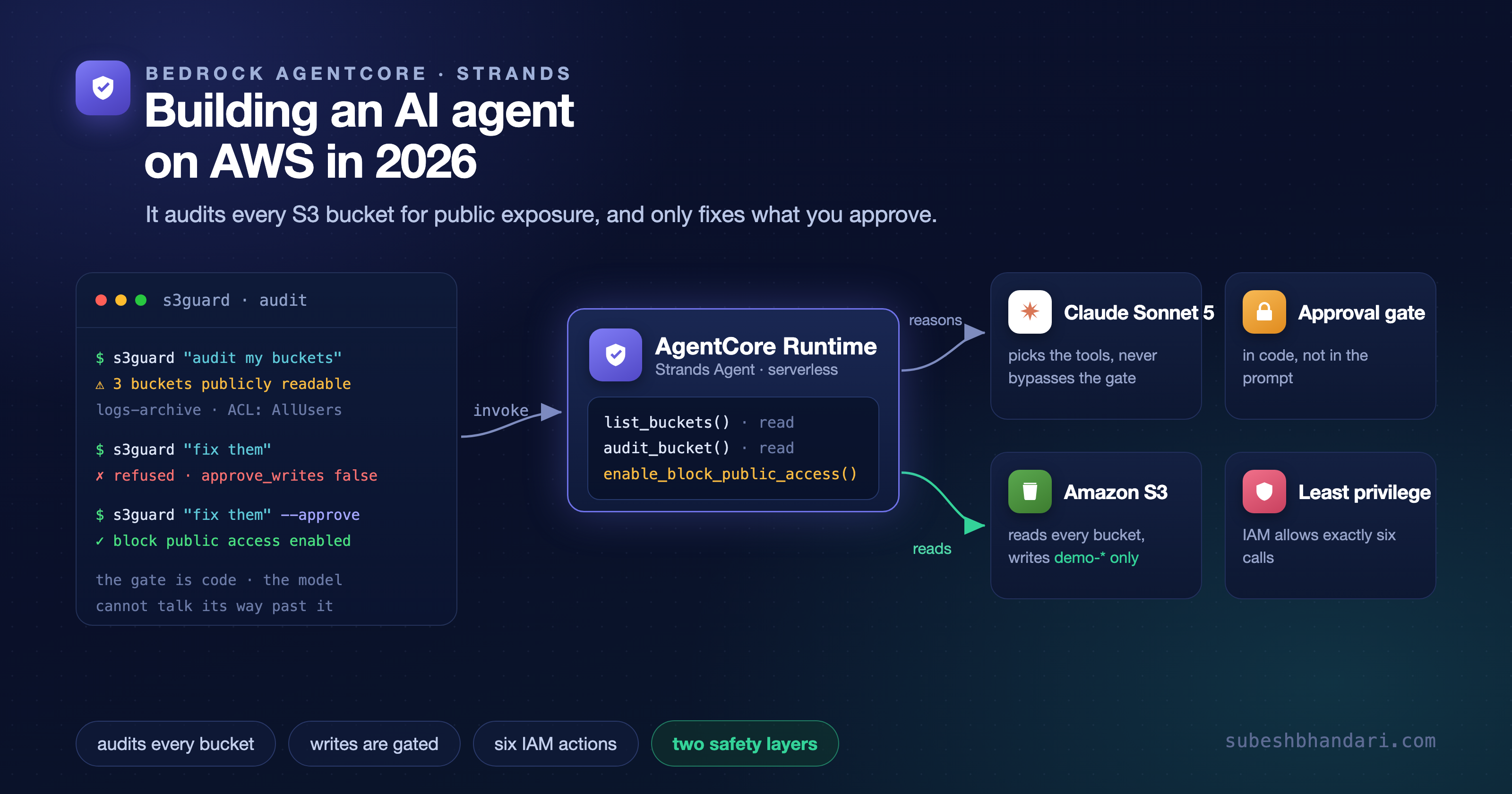
Not another chatbot. We're building S3 Guard, an agent that audits S3 buckets for security misconfigurations, reports findings, and can fix them, but only when a human explicitly approves the write. Two ideas in this design matter more than the agent itself:
- The approval gate is code, not prompt. The write tool checks a flag from the invocation payload. If the caller didn't approve writes, the tool refuses, no matter what the model wants to do. You cannot prompt-inject your way past an
ifstatement. - IAM is the outer boundary. The agent's execution role can only perform the exact six read calls the audit uses, and the one write action is scoped to buckets matching a demo prefix. Even a fully approved, fully confused agent cannot touch anything else.
The stack, in one paragraph each
Strands Agents is the open source agent SDK AWS released in 2025 and now uses internally. You define an agent as a model, a system prompt, and a list of tools, where a tool is a decorated Python function. It handles the agentic loop (model decides, tool runs, result goes back to the model) without ceremony.
Bedrock AgentCore is the infrastructure layer: a serverless runtime that runs your agent in a dedicated microVM per session, plus optional services around it (Gateway for tools, Memory, Identity, Observability, Evaluations, Policy). You pay per second of active compute. Idle agents cost nothing.
The AgentCore CLI (@aws/agentcore on npm) is how you scaffold, run locally, and deploy. Under the hood a deploy synthesizes a CDK app into CloudFormation, so you get reviewable infrastructure instead of console clicks.
Prerequisites
- An AWS account with Bedrock model access in your region
- Node.js 20+ and Python 3.10+
- uv (the CLI uses it to manage the Python project)
- AWS CDK and the AgentCore CLI:
bashnpm install -g aws-cdk @aws/agentcore
I'm running this in ap-southeast-2 with AWS SSO credentials. Any region with AgentCore support works; Sydney happens to have full coverage of every AgentCore component.
Step 1: scaffold the project
bashagentcore create \ --name s3guard \ --project-name s3guard \ --framework Strands \ --model-provider Bedrock \ --build CodeZip \ --language Python \ --memory none \ --protocol HTTP
Two flags deserve attention. --build CodeZip means your code is zipped and uploaded directly: no Docker image, no ECR repository. Container builds are still available if you need system dependencies, but for a plain Python agent CodeZip removes a whole class of build problems (AgentCore runs on ARM64, and cross-building images on an x86 machine is its own adventure). --memory none skips AgentCore Memory, which we don't need for an auditor.
The scaffold gives you two directories that map to the two halves of the system:
s3guard/ app/s3guard/ # your Python agent (Strands) main.py model/load.py pyproject.toml agentcore/ # config + CDK project agentcore.json # what to deploy cdk/ # how to deploy it
agentcore.json declares the runtime: CodeZip build, main.py entrypoint, Python 3.14, public network mode, HTTP protocol. The CDK project reads this file and synthesizes the actual AWS resources.
Step 2: write the agent
The generated main.py is a demo assistant with an add_numbers tool. Replace it. The full file is in the repo; here are the parts that matter.
The tools are plain functions with docstrings. Strands turns the signature and docstring into the tool schema the model sees:
python@tool def audit_bucket(bucket_name: str) -> dict: """Audit one S3 bucket for public access exposure, encryption and versioning.""" findings: dict = {"bucket": bucket_name} try: config = s3.get_public_access_block(Bucket=bucket_name)[ "PublicAccessBlockConfiguration" ] except ClientError as error: if error.response["Error"]["Code"] != "NoSuchPublicAccessBlockConfiguration": raise config = {} findings["public_access_block"] = { setting: config.get(setting, False) for setting in ( "BlockPublicAcls", "IgnorePublicAcls", "BlockPublicPolicy", "RestrictPublicBuckets", ) } # ... policy status, ACL grants, encryption, versioning return findings
The write tool is where the approval gate lives:
python_writes_approved = False # set per invocation from the payload @tool def enable_block_public_access(bucket_name: str) -> str: """Enable all four S3 Block Public Access settings on a bucket.""" if not _writes_approved: return ( "DENIED: the caller has not approved write actions. Do not retry. " "Tell the user to re-invoke with approve_writes set to true..." ) s3.put_public_access_block( Bucket=bucket_name, PublicAccessBlockConfiguration={ "BlockPublicAcls": True, "IgnorePublicAcls": True, "BlockPublicPolicy": True, "RestrictPublicBuckets": True, }, ) return f"SUCCESS: all four Block Public Access settings enabled on {bucket_name}"
A module-level flag looks wrong until you remember the execution model: AgentCore Runtime gives every session its own microVM, so there is no cross-session state to leak. The flag is set in the entrypoint from the payload:
python@app.entrypoint async def invoke(payload, context): global _writes_approved _writes_approved = bool(payload.get("approve_writes", False)) agent = get_or_create_agent(getattr(context, "session_id", "default-session")) async for event in agent.stream_async(payload.get("prompt", "")): if isinstance(event, dict) and "event" in event: yield event
Note what this means: approval is per invocation, decided by the caller, carried in the payload. The model never gets to decide. If it calls the write tool without approval, the tool returns a string telling it exactly what to tell the user, and the model relays it. You'll see it handle that gracefully in a moment.
Step 3: pick the model (and a gotcha)
model/load.py configures the Bedrock model:
pythondef load_model() -> BedrockModel: return BedrockModel(model_id="au.anthropic.claude-sonnet-5")
Two things here that tutorials get wrong in 2026:
The apac. inference profiles are the previous generation. Current Claude models on Bedrock use undated model IDs with new geo prefixes: au. routes inference within Australia (Sydney and Melbourne only), jp. within Japan, global. wherever capacity exists. If data residency matters to your client, this is the difference between "stays in Australia" and "may be served from Tokyo or Mumbai". Outside Australia, use global.anthropic.claude-sonnet-5.
Do not set temperature. My first version passed temperature=0.2 because that's what you did with every previous model generation. Claude Sonnet 5 rejects the request:
ValidationException: An error occurred (ValidationException) when calling the ConverseStream operation: The model returned the following errors: `temperature` is deprecated for this model.
Sampling parameters are deprecated for the adaptive reasoning models. Remove them and it works.
Step 4: run it locally
bashagentcore dev
This starts your agent as a local HTTP server speaking the same protocol contract as the deployed runtime, with hot reload, plus a browser UI called the agent inspector on localhost:8081. The agent endpoint itself listens on localhost:8082, and you can hit it with curl exactly the way AgentCore will:
bashcurl -s -X POST http://127.0.0.1:8082/invocations \ -H "Content-Type: application/json" \ -d '{"prompt": "Audit the bucket s3guard-demo-store-8317 and summarize findings.", "approve_writes": false}'
For the demo I created a bucket with Block Public Access deliberately disabled. The agent found it, ranked it as the critical finding, noted that versioning was disabled as informational, and asked whether it should apply the fix.
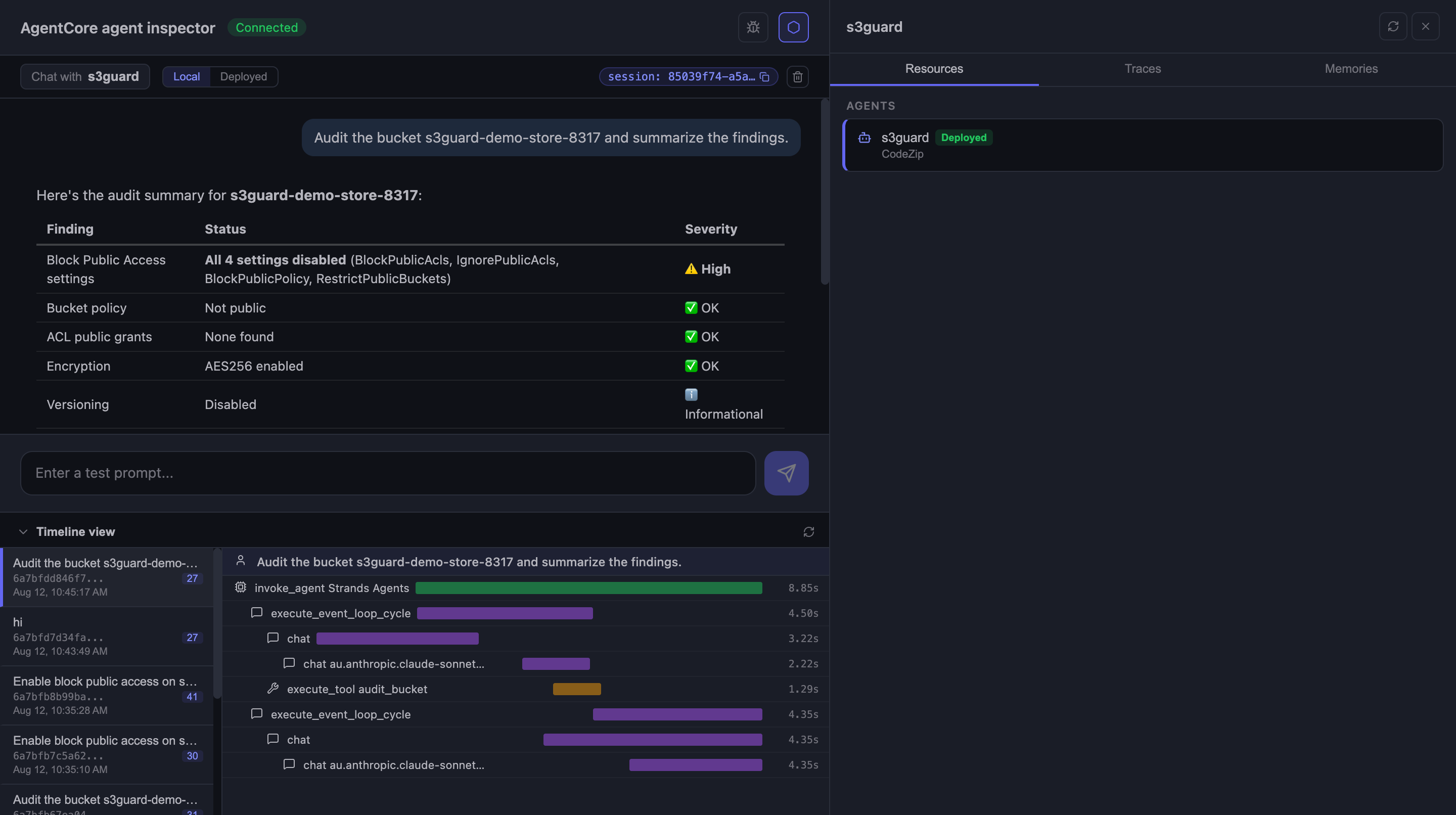
The inspector's trace view (bottom of the screenshot) is worth pausing on: you can see the Strands event loop, each model call to au.anthropic.claude-sonnet-5, and the execute_tool audit_bucket span with timings. You get this locally with zero setup.
Now the important test. Ask it to fix the bucket without approving writes:
The fix was not applied. The action was denied because write actions haven't been approved for this session. To proceed, re-invoke the request with write approval [...] Once you resend it that way, I'll enable all four Block Public Access settings on the bucket.
The tool refused deterministically, and the model explained to the caller how to approve properly. Then the same request with "approve_writes": true applied the fix. And this is not the model claiming success. Checking the bucket directly:
bash$ aws s3api get-public-access-block --bucket s3guard-demo-store-8317 \ --query 'PublicAccessBlockConfiguration' { "BlockPublicAcls": true, "IgnorePublicAcls": true, "BlockPublicPolicy": true, "RestrictPublicBuckets": true }
Step 5: the IAM part every tutorial skips
There are two identities in an AgentCore deployment, and confusing them is the most common source of pain:
- The caller identity invokes the agent. It needs
bedrock-agentcore:InvokeAgentRuntimeon your runtime's ARN, plus CDK permissions if it also deploys. - The execution role is what your agent code runs as. Every boto3 call your tools make, and every Bedrock model call Strands makes, uses this role. The CLI creates it on deploy.
The auto-created execution role can invoke Bedrock models, write logs and traces, and pull your code. It knows nothing about what your tools need, so out of the box the audit tools would fail with AccessDenied. You add tool permissions in the CDK stack (agentcore/cdk/lib/cdk-stack.ts), and this is where you decide the blast radius:
typescriptfor (const env of this.application.environments.values()) { env.runtime.role.addToPrincipalPolicy( new iam.PolicyStatement({ sid: 'S3GuardAudit', actions: [ 's3:ListAllMyBuckets', 's3:GetBucketPublicAccessBlock', 's3:GetBucketPolicyStatus', 's3:GetBucketAcl', 's3:GetEncryptionConfiguration', 's3:GetBucketVersioning', ], resources: ['*'], }) ); env.runtime.role.addToPrincipalPolicy( new iam.PolicyStatement({ sid: 'S3GuardRemediate', actions: ['s3:PutBucketPublicAccessBlock'], resources: ['arn:aws:s3:::s3guard-demo-*'], }) ); }
Read the second statement again. The agent can audit every bucket in the account, but its only write action works exclusively on buckets whose names start with s3guard-demo-. The approval gate in the code is one layer; this is the second, and it holds even if the first one has a bug. When a client asks what makes an agent "production ready", this layering is most of the honest answer.
Step 6: deploy
If the account has never used CDK before, bootstrap once with cdk bootstrap. Then:
bashagentcore deploy
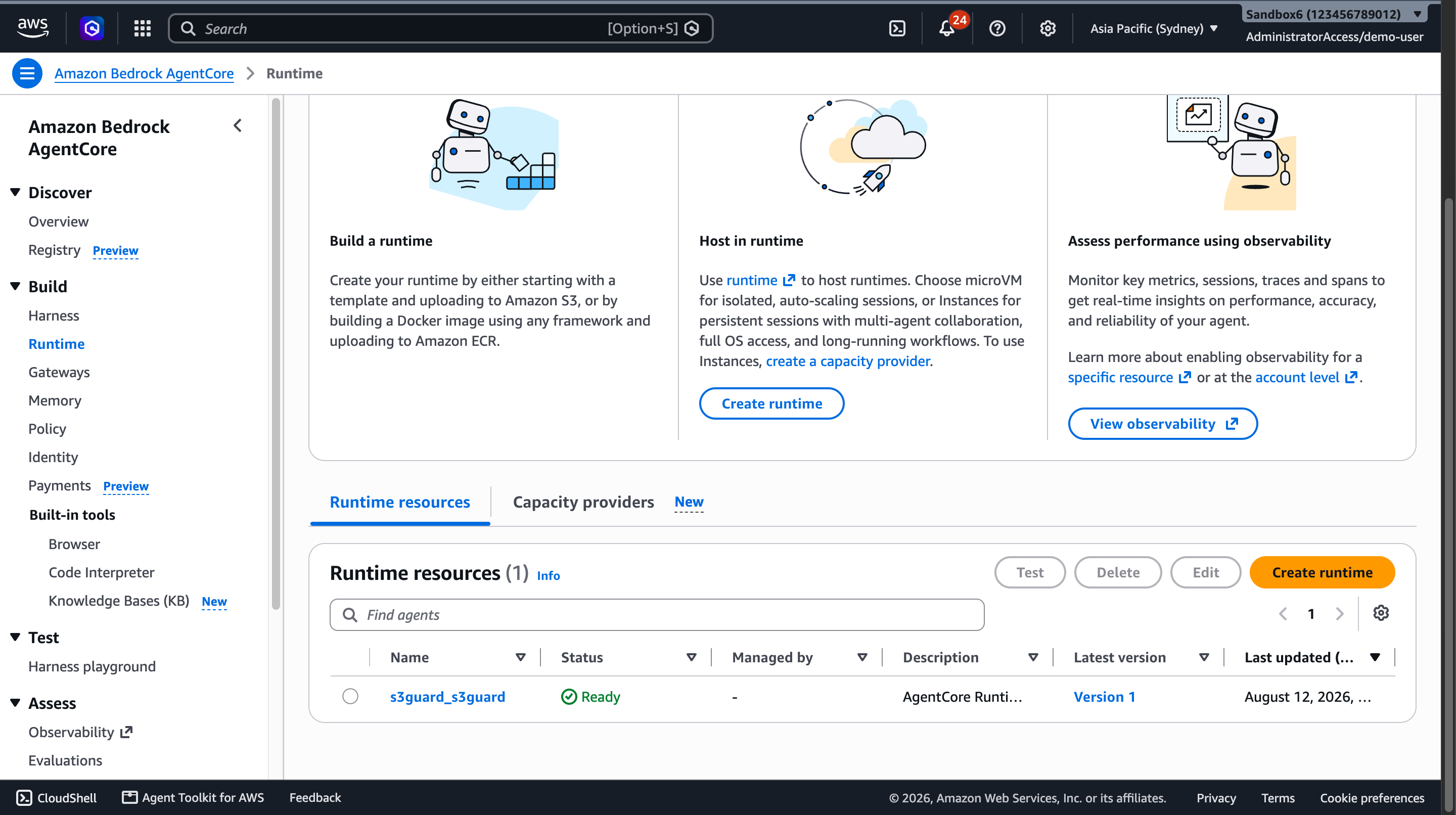
The deploy validates the project, builds and synthesizes the CDK app, zips the code, and drives CloudFormation. It took just under three minutes and finished with:
✓ Deployed to 'default' (stack: AgentCore-s3guard-default) Outputs: RuntimeArn: arn:aws:bedrock-agentcore:ap-southeast-2:123456789012:runtime/s3guard_s3guard-y7rPPxDoL5 RoleArn: arn:aws:iam::123456789012:role/AgentCore-s3guard-default-ApplicationAgentS3guardRu-... RuntimeId: s3guard_s3guard-y7rPPxDoL5 Note: Transaction search enabled. It takes ~10 minutes for transaction search to be fully active and for traces from invocations to be indexed.
What actually got created: the AgentCore runtime, its execution role, and CloudWatch log groups plus trace indexing, all in one CloudFormation stack. That single stack matters later when we delete everything.
Step 7: invoke it, and break it
The quick way:
bashagentcore invoke '{"prompt": "Audit all buckets in this account and report the risky ones."}'
My first cloud invocation failed, and the failure is more instructive than a clean demo:
Error: Model stopped generating due to maximum token limit. The partial message has been added to the conversation history. You can continue by calling the agent again.
The sandbox account has 151 buckets. "Audit all buckets and report" asked the model to enumerate 151 audits in prose, and it blew through the output token limit mid-report. The lesson is not "raise max tokens". The lesson is that aggregation belongs in tools, not in the model's mouth: a production version of this agent should have a find_exposed_buckets tool that loops over buckets in Python and returns only the offenders, instead of making the model narrate 151 results. Tool design is context management.
A scoped prompt works fine, cold start included (23.5 seconds wall clock, most of it model time):
$ agentcore invoke '{"prompt": "Audit the buckets whose names start with s3guard-demo and summarize the findings."}' ## Audit Summary — s3guard-demo-store-8317 1. 🔴 Critical — Block Public Access fully disabled. All four settings are false. While no public policy or ACL grants are currently active, nothing prevents someone from adding one in the future. 2. 🟢 No immediate exposure: bucket policy is not public, no public ACL grants. 3. 🟢 Encryption enabled: AES256 default encryption is configured. 4. 🟡 Informational: versioning disabled. Recommendation: Enable Block Public Access on this bucket. Want me to apply that fix now?
From application code, the runtime is one boto3 call. This is what your backend would do:
pythonimport boto3, json, uuid client = boto3.client("bedrock-agentcore", region_name="ap-southeast-2") response = client.invoke_agent_runtime( agentRuntimeArn=agent_arn, runtimeSessionId=str(uuid.uuid4()) + "0000", # session IDs need 33+ chars payload=json.dumps({ "prompt": "Audit s3guard-demo-store-8317. If block public access is not fully enabled, fix it.", "approve_writes": True, }).encode(), qualifier="DEFAULT", ) for line in response["response"].iter_lines(): ... # SSE stream: lines prefixed "data: " carry the event JSON
That invocation audited the bucket, applied the approved fix, and reported back in 15.3 seconds, and the fix was verified against the real bucket state afterwards. The session ID matters: invocations sharing a session ID land on the same microVM with conversation history intact, so "fix the ones you found" works as a follow-up. New session ID, fresh microVM, cold start.
Observability
Two useful layers, no extra code:
- Locally, the agent inspector shows a full trace waterfall per invocation: event loop cycles, model calls, tool spans with durations (visible in the screenshot above).
- Deployed, the runtime emits structured logs to CloudWatch and OpenTelemetry traces to CloudWatch Transaction Search (that's the "transaction search enabled" note in the deploy output). The runtime also publishes metrics under the
AWS/Bedrock-AgentCorenamespace; that's where the billing numbers below come from.
What this actually cost
Nobody publishes real numbers, so here are mine, measured from CloudWatch after a full day of building, testing locally, deploying, and invoking in the cloud.
| Item | Measured usage | Rate | Cost |
|---|---|---|---|
| Claude Sonnet 5 input tokens | 38,707 | $3.00 / 1M | $0.116 |
| Claude Sonnet 5 output tokens | 7,339 | $15.00 / 1M | $0.110 |
| AgentCore Runtime compute | 17.4 active seconds (3 cloud invocations) | $0.0895 / vCPU-hr + $0.00945 / GB-hr | under $0.001 |
| CloudWatch logs and traces | a few MB | standard rates | about $0.01 |
Total: roughly 24 US cents, and over 95 percent of it is model tokens. That includes every local test run, the failed full-account audit, and all cloud invocations. The runtime itself is effectively free at this scale because it bills per second of active compute only; an idle deployed agent costs zero. (Anthropic is running introductory Sonnet 5 pricing of $2/$10 per million until the end of August 2026, which would make this about 15 cents.) There is no AgentCore free tier, so the cleanup below is not optional hygiene, it's the thing that keeps this at 24 cents.
Cleanup
Here's a current-tooling surprise: the CLI has no destroy command (its remove subcommand only edits project config). Since the deploy is one CloudFormation stack, teardown is one call:
bashaws cloudformation delete-stack --stack-name AgentCore-s3guard-default aws cloudformation wait stack-delete-complete --stack-name AgentCore-s3guard-default
That removes the runtime, the execution role, and the stack. Two things survive it, so check:
bash# demo bucket aws s3 rb s3://s3guard-demo-store-8317 --force # the runtime's log group is retained by default aws logs describe-log-groups \ --query "logGroups[?contains(logGroupName, 's3guard')].logGroupName" aws logs delete-log-group \ --log-group-name "/aws/bedrock-agentcore/runtimes/s3guard_s3guard-<id>-DEFAULT"
After that, list-agent-runtimes returns empty, no s3guard IAM roles remain, and the account is exactly as it started.
Where to take this
The pattern in this post (read tools free, write tools gated and IAM-scoped) extends to most agents worth building: a support agent that reads orders freely but refunds behind a gate, an ops agent that reads dashboards freely but restarts services behind a gate. The agent framework is the easy part now; a working agent is an afternoon. The judgment calls that make it safe to point at real infrastructure, the IAM boundaries, the approval flows, the failure modes like the token-limit one above, are where the actual work is.
The complete project is at github.com/subeshb1/s3guard. If you're building something like this and want help getting it production ready, get in touch.
Subesh Bhandari
Engineer · Writer · Builder
Join the conversation
Comments are powered by GitHub.